

Pigging Oil Flow in a Pipeline: VOF CFD Simulation
Price: $20
The present problem simulates the pigging oil flow inside pipelines using ANSYS Fluent software.
Pigging Oil Flow in a Pipeline: VOF CFD Simulation
Price: $20
The present problem simulates the pigging oil flow inside pipelines using ANSYS Fluent software.
Pigging Oil Flow in a Pipeline CFD Simulation, ANSYS Fluent Training
The present problem simulates the pigging oil flow inside pipelines using ANSYS Fluent software. Inside this model's pipeline is a piece called a pig.
The term pig stands for Pipeline Inspection Gauge and is used in pipelines to check and record geometric and fluid information, as well as other items such as cleaning pipes and creating a physical barrier between two different fluids, etc Using pigs inside pipelines and controlling and directing them is called pigging.
Since the presence of pigs in the passage of fluid flow can act as a barrier, the use of these pigs can cause a pressure drop in the flow of the desired fluid, which is known as a problem that must be addressed. The present model defines a simple stationary pig inside a pipeline.
The purpose of the present simulation is to investigate the behavior of the fluid around the body of this pig inside the pipe and the pressure drop on both the upper and lower sides of the pig.
The simulation process is performed in two modes. Thus, oil flow with different inlet speeds, including 0.9 m/s and 1.9 m/s,, enters the pipeline's interior.
Also, the VOF multi-phase model has been used to define the oil and gas materials in the pipelines and two materials have been defined as gas-oil and petro in the present model. This simulation was performed in 90 seconds with a time step of 0.03 seconds.
Geometry & Mesh
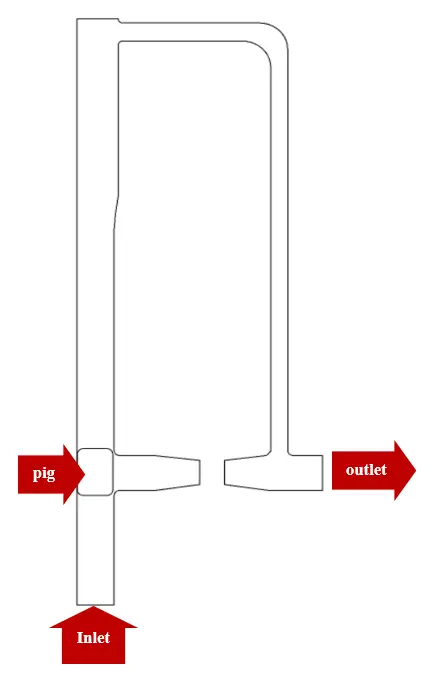
The present model is designed in two dimensions using Design Modeler software. The model includes a pipeline with a certain geometry with a simple pig inside it. The following figure shows a view of the geometry.
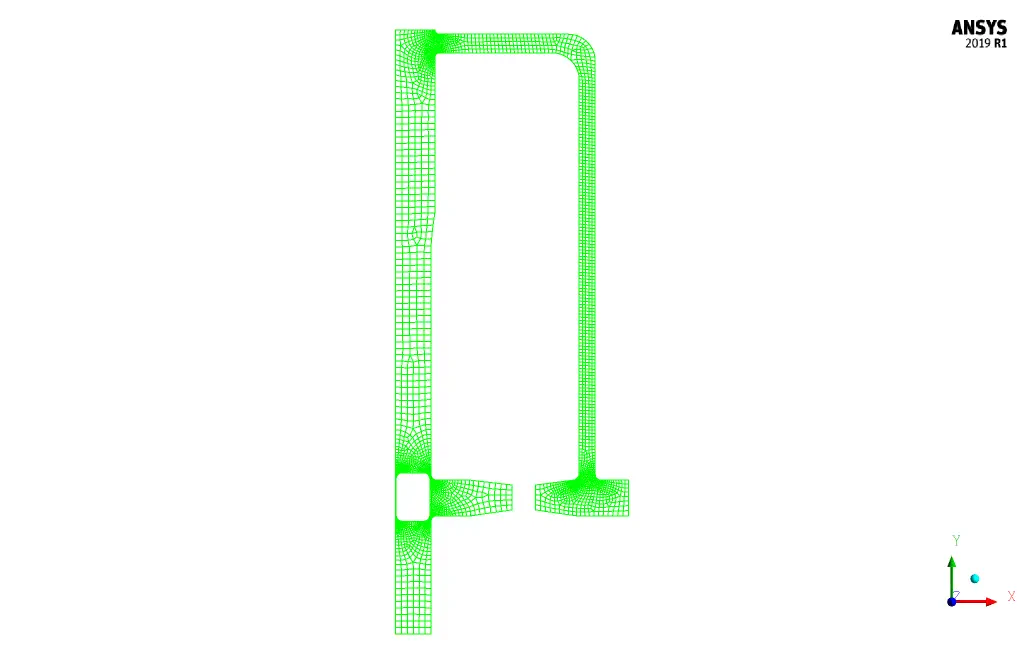
The meshing of the present model has been done using ANSYS Meshing software. The mesh type is unstructured and the element number is 5789. The following figure shows an overview of the mesh.
Pigging CFD Simulation
To simulate the present model, several assumptions are considered:
- We perform a pressure-based solver.
- The simulation is transient; the amount of pressure drop changes on the pig's top and bottom sides have been investigated over time.
- The gravity effect on the fluid is ignored.
A summary of the defining steps of the problem and its solution is given in the following table:
| Models | ||
| Viscous | k-epsilon | |
| k-epsilon model | standard | |
| near-wall treatment | standard | |
| Multiphase Model | VOF | |
| number of Eulerian phases | 2 (gas-oil & petro) | |
| formulation | implicit | |
| interface modeling | sharp | |
| Boundary conditions | ||
| Inlet 1 | Velocity Inlet | |
| velocity magnitude | variable (0.9 & 1.9 m.s-1) | |
| volume fraction for petro | 1 | |
| volume fraction for gas-oil | 0 | |
| Outlet | Pressure Outlet | |
| gauge pressure | 0 pascal | |
| Walls (walls of pipeline & walls of pig) | Wall | |
| wall motion | stationary wall | |
| Methods | ||
| Pressure-Velocity Coupling | SIMPLE | |
| Pressure | PRESTO | |
| momentum | second-order upwind | |
| volume fraction | compressive | |
| turbulent kinetic energy | first-order upwind | |
| turbulent dissipation rate | first-order upwind | |
| Initialization | ||
| Initialization methods | Standard | |
| gauge pressure | 0 pascal | |
| x-velocity | 0 m.s-1 | |
| y-velocity | variable (0.9 & 1.9 m.s-1) | |
| petro volume fraction | 0 | |
Pigging Results
At the end of the solution process, two-dimensional contours related to the pressure, velocity, and volume fraction of each phase defined in the model are obtained. All contours of both cases are obtained at the last second of the simulation process.