

SpaceClaim Training Course

SpaceClaim Training Course

25
5h 1m 45s
  1. Section 1

    Introduction and History

    1. Lesson 1 10m Free
  2. Section 2

    Workspace, Toolbars and Tree Panel

    1. Lesson 1 12m 52s Free
  3. Section 3

    Layout, Units and Display Tools

    1. Lesson 1 10m 29s Free
  4. Section 4

    Advanced Sketch Tools

    1. Lesson 1 16m 2s Free
  5. Section 5

    3D Modeling

    1. Lesson 1 29m 22s Free
  6. Section 6

    The Powerful Move Tool

    1. Lesson 1 17m 31s Free
  7. Section 7

    Pattern Tool

    1. Lesson 1 14m 28s Free
  8. Section 8

    The useful Combine Tool

    1. Lesson 1 14m 55s Free
  9. Section 9

    Practical Overview of Move, Combine and Split Tools

    1. Lesson 1 13m 25s Free
  10. Section 10

    Fill Tool

    1. Lesson 1 7m 55s Free
  11. Section 11

    Blend Command

    1. Lesson 1 10m 5s Free
  12. Section 12

    Replace, Fill pattern and Mirror Tools

    1. Lesson 1 7m 46s Free
  13. Section 13

    Shell Tool

    1. Lesson 1 6m 59s Free
  14. Section 14

    Offset Tool

    1. Lesson 1 4m 2s Free
  15. Section 15

    Enclosure Tool

    1. Lesson 1 8m 1s Free
  16. Section 16

    Creating Assembly

    1. Lesson 1 16m 19s Free
  17. Section 17

    Measure Tools

    1. Lesson 1 12m 3s Free
  18. Section 18

    Repair Tab

    1. Lesson 1 8m 39s Free
  19. Section 19

    Repair: Part 2

    1. Lesson 1 19m 58s Free
  20. Section 20

    Practical Prepare Tab

    1. Lesson 1 8m 27s Free
  21. Section 21

    Facets Tab

    1. Lesson 1 10m 18s Free
  22. Section 22

    Spaceclaim Meshing

    1. Lesson 1 15m 1s Free
  23. Section 23

    Parametric Modeling

    1. Lesson 1 7m 3s Free
  24. Section 24

    Script Modeling

    1. Lesson 1 9m 4s Free
  25. Section 25

    SpaceClaim share topology

    1. Lesson 1 10m 57s Free
MR CFD
Oops! You are not logged in.

For watching this lesson you should sign in first, if you don't have an account, you can create one in seconds.

Toggle Lesson List

SpaceClaim Training Course — Ep 01

Session 25

Lesson
01
Run Time
10m 57s
Published
May 5, 2026
Course Progress
0%
Mark as Complete
Add to Watchlist
About This Lesson
  1. Introduction
    Share Topology in SpaceClaim is a highly practical feature that directly influences how your mesh is generated. In essence, Share Topology is a geometric operation that makes adjacent bodies share the same faces and edges at their contact interfaces. When applied, the mesh on both sides of the interface becomes conformal, meaning the nodes match exactly across the shared boundary.

  2. Objectives
    To clearly demonstrate how Share Topology works, we will build a simple geometry and mesh it in two different scenarios. In the first case, we apply Share Topology before meshing; in the second case, we mesh the same geometry without using this command. Without Share Topology, the inner and outer regions do not share nodes, resulting in a non‑conformal interface where the two meshes remain independent. With Share Topology, the interface faces are shared, nodes align perfectly across the boundary, and the result is a single, continuous, fully conformal mesh over the entire geometry.
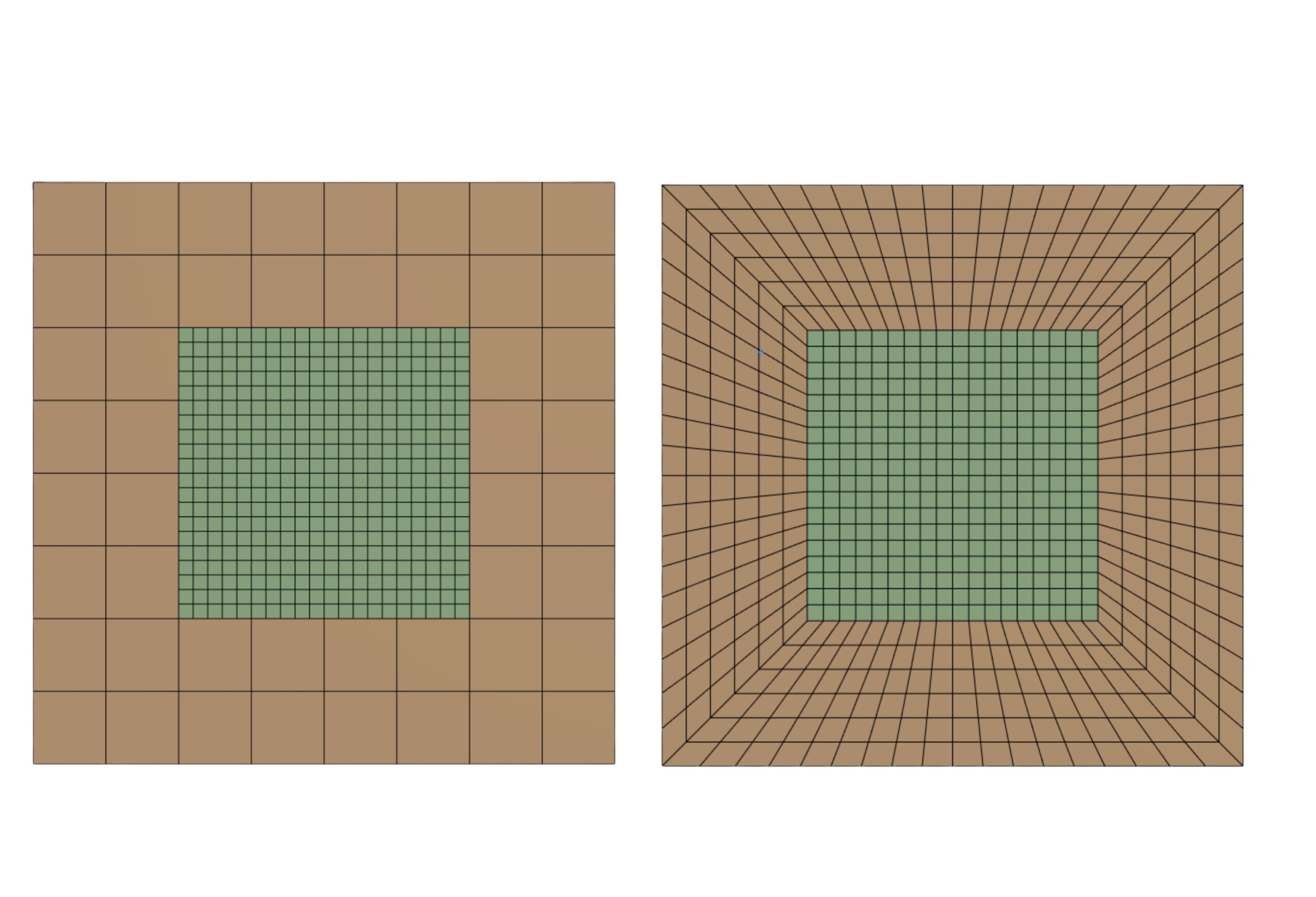
  3. SpaceClaim share topology

  4. Summary
    Generating a conformal mesh is essential for many CFD simulations, as it ensures solution continuity across shared interfaces. SpaceClaim’s Share Topology is therefore a key tool, providing the main mechanism to create such meshes. In this session, the aim was to show different ways of handling shared geometry and to illustrate how applying or omitting Share Topology changes the structure and quality of the final mesh.